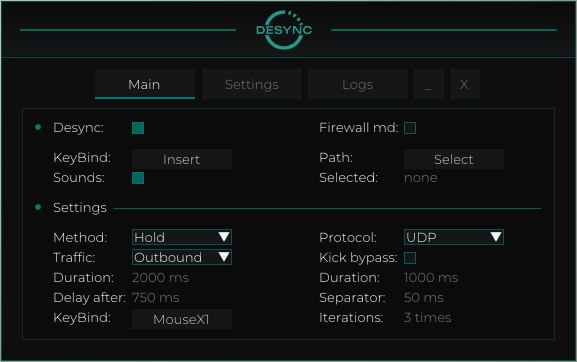
Main Tab: Enable desync – activates all core features Enable Keybind – keybind to activate features Sounds – sound effects for actions (e.g. activation) Firewall mode – uses Windows Firewall instead of a driver Path – path to the target executable/game (used with Firewall mode) Method – activation method selection: Temporary: desync runs according to configured duration Pressing: runs until the key is pressed again Hold: runs while the key is being held down Traffic – type of traffic to block: Outbound: outgoing traffic Inbound: incoming traffic Duration – desync active time (without kick bypass, for Temporary method) Delay after – delay after desync ends before it can be reactivated KeyBind – main hotkey for desync activation Protocol – traffic protocol to block: UDP TCP Kick bypass – prevents disconnection from the game due to poor connection: Duration: duration of each desync cycle Separator: delay between desync cycles Iterations: number of desync repetitions (Duration * Iterations) Settings Tab: Randomizator – randomizes the duration of the block Fix Traffic – emergency button to restore internet if something goes wrong Save Configuration – saves current config Reset Configuration – resets config to default settings Logs Tab: All logs – enables log display during desync activation Delete Logs – removes log files Log File – location of the log file Logs – displays software activity logs


 Catalog


 Processor
 OS
OS




.jpg.webp)